Berkas app icon For macOS

The file manager
your Mac deserves.

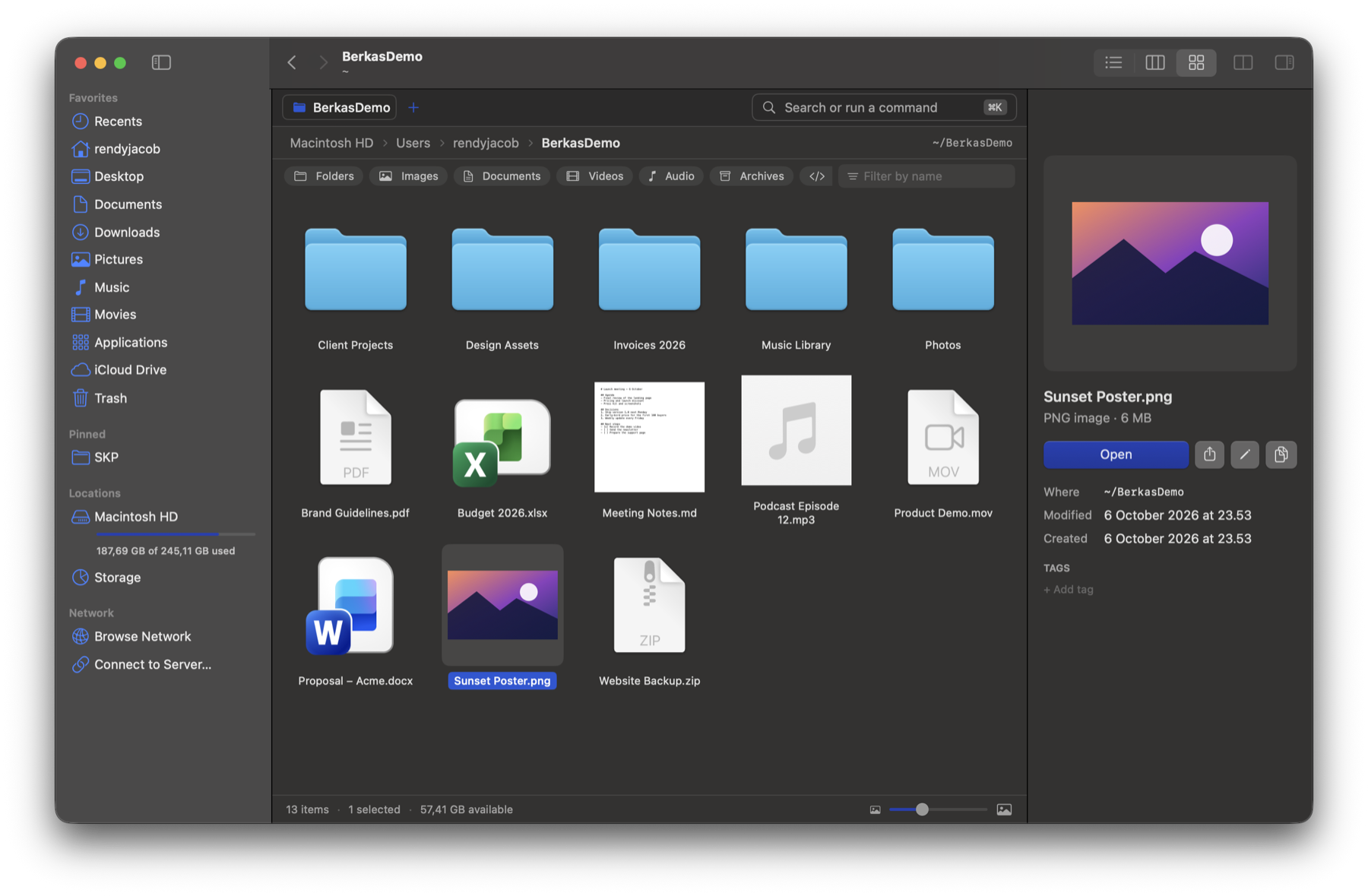
Berkas opens folders instantly, puts two folders side by side, finds anything with ⌘K, and can take over your Desktop from Finder. Switch back any time.

macOS 14 Sonoma or later · Apple silicon & Intel · Version 1.0.0

Berkas showing a folder in grid view with a preview panel

Everything you do with files, faster.

Built natively for the Mac with the shortcuts you already know, plus the ones Finder never had.

⚡

Instant folders

Listings are cached and prefetched, so switching folders feels immediate and stays quick even in huge folders.

◫

Split view & tabs

Two folders side by side with ⌘\. Drag between them to move, hold ⌥ to copy.

⌘

Command palette

Press ⌘K to run any action, jump to a path, or search names and file contents.

Aa

Batch rename

Replace text, add dates or numbers, change case. Preview every name first, undo with ⌘Z.

▣

Your Desktop, upgraded

Berkas can draw the Desktop: marquee select, Sort By, Clean Up, and drag & drop on every display.

◔

Storage insights

See what fills your disk: largest folders, categories, and safe clean-up suggestions.

☝︎

Single-click option

Coming from Windows? Open folders with one click, while files still open with a double-click.

⤓

Drag & drop everywhere

Spring-loaded folders, tabs, sidebar and path bar. Drop real files into Mail, Terminal or your browser.

☁︎

iCloud & servers

iCloud Drive status with Download Now. Connect to SMB, AFP and WebDAV servers with ⌥⌘K.
Feels like a Mac app, because it is one.

Written in Swift for macOS. No web views, no tracking.

  • Quick Look with Space, Get Info with ⌘I
  • Finder tags, Open With, Show in Finder requests
  • Undo for moves, renames, trash and more
  • Light and dark mode follow your system
  • Your tabs and folders come back after a restart
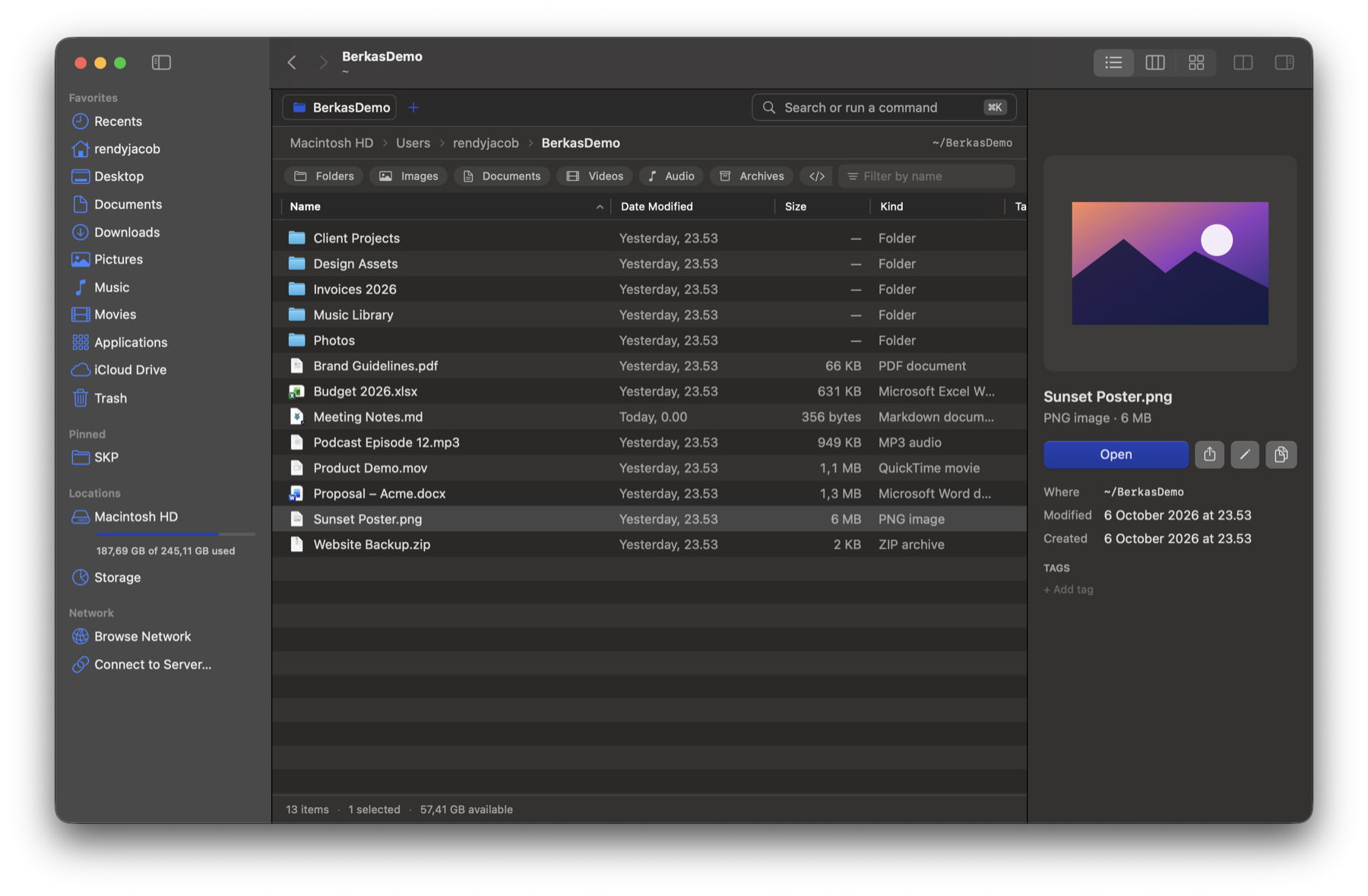
Berkas list view with sortable columns

Berkas vs Finder

Finder is fine. Berkas adds the things people keep asking Finder for.

FeatureBerkasFinder
Two folders side by side in one window✓—
Command palette with content search✓—
Batch rename with rules and dates✓Basic
Storage breakdown and clean-up suggestions✓—
One-click filters: images, documents, videos…✓—
Open folders with a single click✓—
Tabs, Quick Look, tags, iCloud Drive✓✓

Get Berkas

Use it alongside Finder or let it take over. You decide, and you can switch back any time.

Buy Berkas

· one license for one Mac · requires macOS 14 Sonoma or later.

Questions

Does Berkas replace Finder completely?

Only if you want it to. Berkas works as a normal app. Choose “Use Berkas Instead of Finder” and it also draws your Desktop, opens at login, handles “Show in Finder” and comes forward with ⌥⌘B from anywhere.

Can I go back to Finder?

Yes, with one click: Berkas › Settings › Restore Finder. Everything returns to how macOS had it.

How do I install it?
  1. Open the downloaded Berkas.dmg and drag Berkas into Applications.
  2. Open Berkas from Applications. If macOS says it can’t verify the app, open System Settings › Privacy & Security, scroll down and click Open Anyway. You only need to do this once.
Why does Berkas ask for Full Disk Access?

It’s optional. It lets Berkas show protected folders, empty the Trash itself and scan all of your storage. Without it, everything else works normally.

Does Berkas collect my data?

No. Your files never leave your Mac. Berkas only talks to our server to activate your license, to re-check it every few days, and to look for updates once a day (which you can turn off). See the privacy policy.

Can I use one license on two Macs?

One license works on one Mac at a time. Moving to a new Mac? Choose Berkas › Settings › License › Deactivate on the old one, then activate on the new one. Lost the old Mac? Remove it on the license page.

Does Berkas need the internet?

Only once, to activate your license. After that it works offline.

Which Macs are supported?

Any Mac with Apple silicon or Intel running macOS 14 Sonoma or later.